
Free Excel template
Free Attendance Tracker for Your Academy
Mark attendance by day, skip academy holidays automatically, and see each student’s monthly attendance % in one Excel file.
Download the free trackerExcel (.xlsx) · Best on a computer · Free, no signup
Want help setting it up? Ask us below

Preview with sample data. These are made-up students.
What you get
Mark each day in seconds
Set the day to C for class or H for holiday, then mark each student P, A or L.
Holidays never count against students
Holiday columns are greyed out, refuse entries, and are left out of every percentage.
Monthly percentage and status
Present divided by classes conducted. Below 70% is Needs attention, 70–79% is Watch, 80% and above is On track.
A monthly summary, ready to read
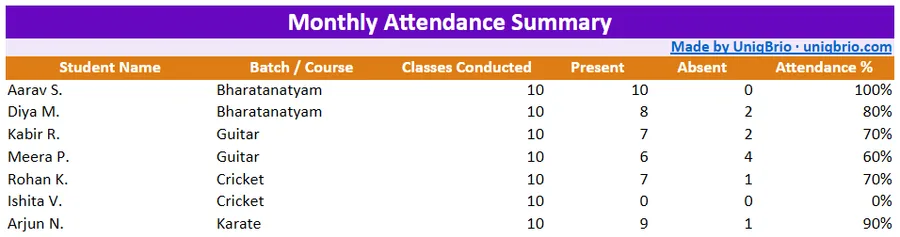
Preview with sample data. These are made-up students.
How to use it
- Download the file and open it in Excel on your computer.
- In row 3, choose C for every day you hold classes and H for every academy holiday.
- On class days, mark each student P (present), A (absent) or L (student leave).
- Read each student’s attendance % and status. The Monthly Summary sheet lists them all.
Make a fresh copy of the file for each month.
Want help setting it up?
Optional. Tell us your academy name and mobile number and we’ll help you get started.
Start simple. Grow when you’re ready.
Start with a simple tracker today. When you’re ready to stop chasing fees by hand, AcademyOne sends the reminder on WhatsApp with a UPI pay button and records the payment itself. Parents need WhatsApp for this.